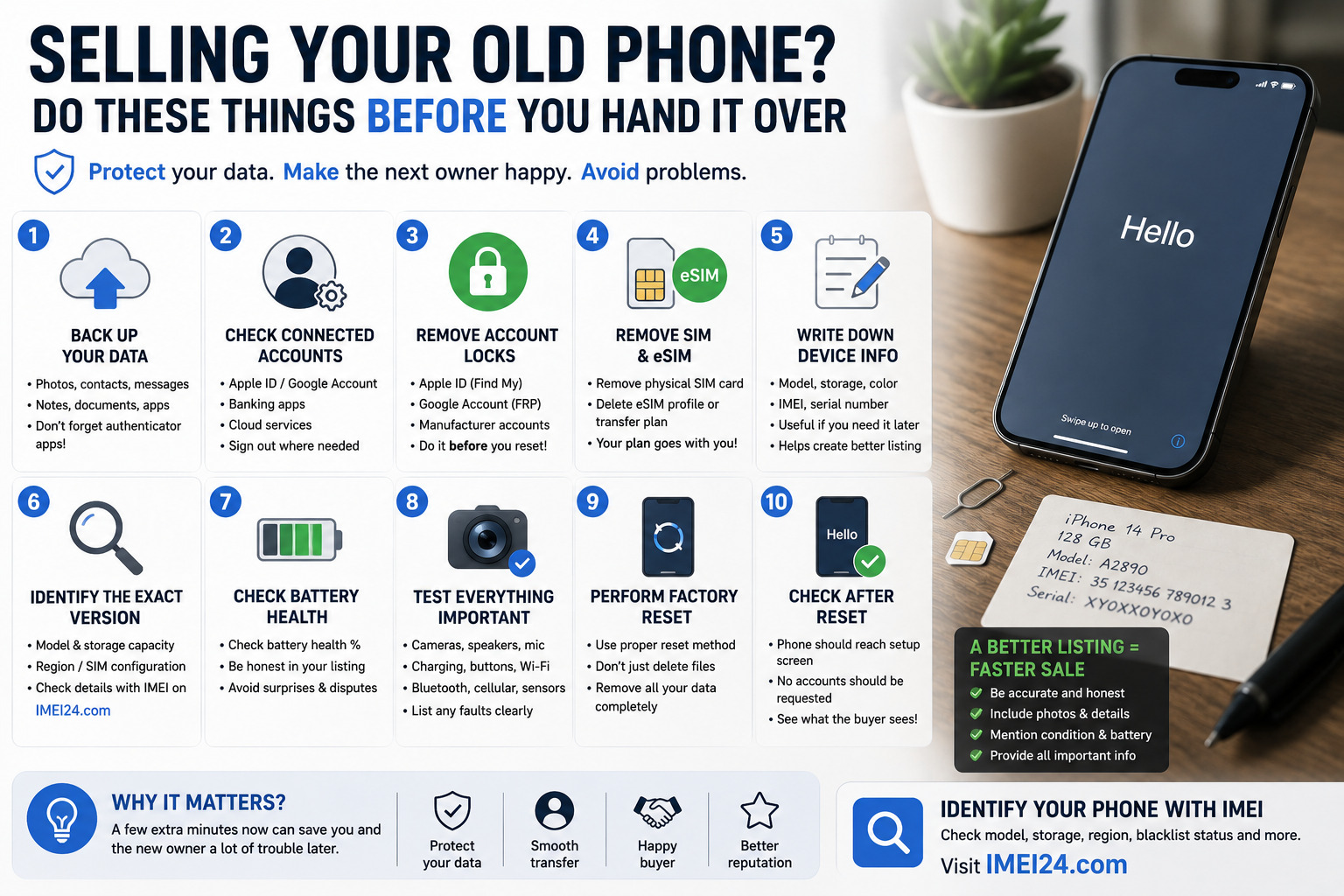
Selling Your Old Phone? Do These Things Before You Hand It Over
A new smartphone arrives, the old one goes into a drawer, and sooner or later you decide to sell it.
Sounds simple.
Take a few photos, write a listing, reset the phone and hand it to the new owner.
But a factory reset should not be the first thing you do.
Before an old smartphone leaves your hands, there are several things worth checking - both to protect your data and to make life easier for the next owner.
1. Don't erase the phone immediately
This is probably the easiest mistake to make.
Before resetting anything, make sure everything you actually want to keep has been transferred or backed up.
That may include:
• photos and videos
• contacts
• messages
• notes
• authenticator apps
• documents
• saved passwords
• app data
Photos are obvious.
Authenticator apps are easier to forget.
If you use your old phone for two-factor authentication, make sure you can still access important accounts after the device is erased.
2. Check what accounts are connected to the device
Your phone is probably connected to much more than your mobile number.
Apple ID, Google Account, manufacturer accounts, banking applications, password managers, cloud storage and other services may all be linked to it.
Before selling the device, make sure you understand which accounts need to be signed out or transferred.
This is particularly important because anti-theft systems can remain associated with a device even after it changes hands if the correct removal procedure is not followed.
3. Remove activation and account-related locks correctly
Modern smartphones include security features designed to make stolen devices difficult to reuse.
That is excellent protection while you own the phone.
It becomes a problem when you legitimately sell it but forget to remove your account first.
Depending on the platform, this can involve features associated with an Apple ID, Google Account or manufacturer-specific account.
The new owner should not discover during setup that the phone still expects credentials belonging to you.
Do this while the device is still in your possession.
Fixing account problems after shipping a phone to someone else is much less convenient.
4. Don't forget about your SIM and eSIM
A physical SIM card is easy to see.
Remove it before handing over the phone.
eSIM is easier to forget because there is nothing physical to take out.
If you use eSIM, check how your carrier handles transferring the mobile plan to your new device and make sure the old phone no longer contains an active profile that should not remain there.
Remember that an eSIM profile and the smartphone itself are not the same thing.
Your mobile subscription should move with you - not with the phone you sell.
5. Write down the important device information
Before performing the final reset, take a moment to record basic information about the smartphone.
Useful details can include:
• exact model
• storage capacity
• model number
• IMEI
• serial number
Why bother if you are selling it?
Because once the phone is gone, you may still need some of this information if there is a question about the transaction, shipping, device identification or the listing itself.
It also helps you create a more accurate advertisement.
6. Make sure you are advertising the correct version
"iPhone Pro" or "Samsung Galaxy" isn't a very useful description for a buyer.
Modern phones can have multiple storage capacities, regional versions and SIM configurations.
Before creating the listing, identify exactly what you are selling.
Depending on the device and available information, an IMEI lookup on IMEI24 may provide details such as:
• manufacturer
• exact model
• product name
• storage version
• device SKU
• IMEI1 and IMEI2
• blacklist status
• other available device information
This can help you compare the phone with the description you plan to publish.
7. Be honest about battery condition
A four-year-old smartphone with its original battery will not usually behave like a new device.
If the operating system provides battery health information, check it before selling.
A buyer would rather know about a worn battery before paying than discover it two days later.
And from the seller's perspective, accurate information reduces the chance of unnecessary disputes.
8. Check the cameras, speakers and charging before listing it
We get used to small problems with devices we use every day.
Maybe one speaker sounds slightly quieter.
Perhaps the charging connector needs the cable positioned correctly.
Maybe one camera struggles to focus.
Before selling, test the phone as if you had just bought it yourself.
Check:
• touchscreen
• cameras
• microphones
• speakers
• buttons
• charging
• Wi-Fi
• Bluetooth
• cellular connectivity
• biometric authentication
If something does not work correctly, mention it in the listing.
9. Now perform the factory reset
Once your data is backed up, accounts are handled correctly, SIM or eSIM has been taken care of and the device information has been recorded, you can prepare the phone for its new owner.
Use the manufacturer's proper factory reset procedure rather than manually deleting photos, messages and apps one by one.
The goal is simple:
your information should leave the phone before the phone leaves you.
10. Check the phone after the reset
Don't immediately put the device in a box.
Turn it on again.
Make sure it reaches the initial setup screen and does not unexpectedly request credentials that should have been removed before the sale.
You don't need to configure the phone again.
You simply want to see what the buyer will see when they switch it on for the first time.
A better listing benefits both sides
Once everything is ready, your advertisement can contain useful, specific information rather than vague phrases.
Include the exact model, storage capacity, physical condition, battery information where appropriate and any faults you discovered during testing.
If you know the device's regional version or SIM configuration, that can also be useful information for potential buyers.
The more accurate the listing, the fewer surprises after the sale.
Final thoughts
Selling an old smartphone is not just about wiping the screen and pressing "factory reset".
The phone may contain years of personal information, active accounts, authentication tools and mobile service settings.
Take care of those first.
Then identify exactly what you are selling, record the important device information and test the hardware one last time.
If you need additional information associated with the phone's IMEI, you can check the available device details on IMEI24.
Ten extra minutes before handing over your old phone can save both you and its new owner a lot of unnecessary trouble.